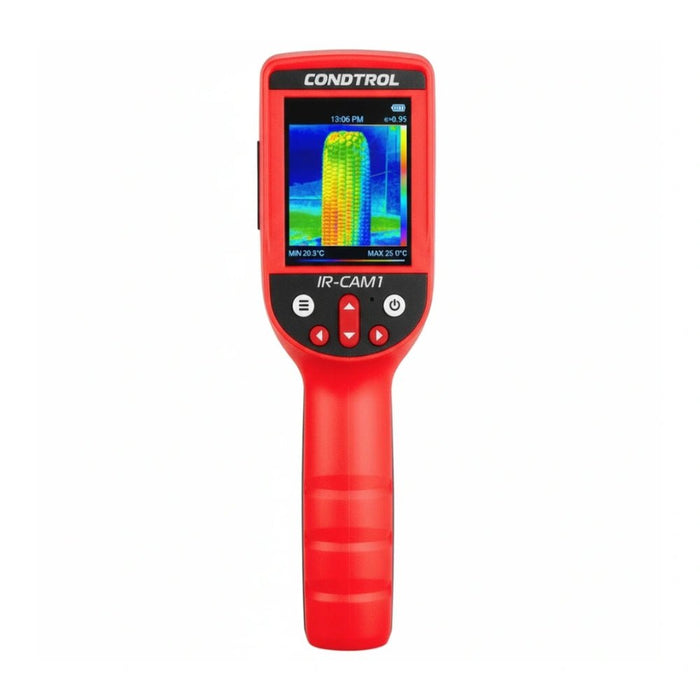
Thermal imaging camera in construction: leaks, insulation, moisture
Thermography makes the invisible visible: leaks, missing insulation and hidden moisture. This guide shows how to use a thermal imaging camera in practice, avoid typical mistakes and document clear findings – from a quick check to a robust report.

In this article
Category: thermal imaging cameras · IR-Cam 2 Pro · Tripods & telescopic poles · Warranty 2+1 years
Applications in 30 seconds
- Leaks: heating/water pipes, flat roofs, underfloor heating – temperature anomalies show the course.
- Insulation / thermal bridges: gaps, connection details, window reveals – make energy losses visible.
- Moisture & mould risk: identify cold zones/areas close to the dew point; confirm with a moisture measurement.
- QA in fit-out: before/after comparisons, acceptance inspections, warranty documentation.
Preparation & conditions
- Temperature difference: aim for an inside/outside ΔT of at least 10 K (better 15–20 K) for the building envelope.
- Weather: wind below 3 Bft, no direct sunlight; for roofs allow enough time to cool down.
- Emissivity (ε): set it to suit the material (e.g. plaster/paint high, metal low). Cover shiny surfaces with matt tape or chalk.
- Reflections: actively avoid reflections (windows/metal); vary the camera position.
- Calibration / NUC: let the camera stabilise thermally; trigger the non-uniformity correction (NUC) if available.
Note: for qualitative building thermography, DIN EN 13187 and ISO 6781, among others, are used as references in practice.
Step by step: 5 workflows
1) Leak detection (heating/water pipe)
- Briefly increase heat generation (heating circuit/hot water), clear the surfaces.
- Hold the camera perpendicular to the surface; use isotherms/alarms to mark hotspots.
- Document the course of the pipe; take cross-bearings for concealed areas.
- Secure the location with a visible marking (photo pair: IR + daylight).
2) Checking underfloor heating
- Hydraulics active; raise the flow temperature slightly.
- Scan the loops and check for even distribution; cold strips indicate air/blockage.
- Save screenshots with scale/notes for the documentation.
3) Insulation & thermal bridges
- Plan the ΔT and take the images quickly (before sunrise or in the evening).
- Problem zones: roller shutter boxes, reveals, parapets, balcony connections.
- Mark hot/cold spots with arrows & comments; compare inside/outside.
4) Suspected moisture / condensation zones
- Identify cold areas; always cross-check with a moisture meter.
- Note the room climate (RH/°C); explain proximity to the dew point.
- If confirmed: assign the cause (thermal bridge/ventilation/leak).
5) Flat roof screening
- Measure late in the evening after a sunny day (use the thermal inertia of moisture).
- Mark suspicious areas as polygons; plan probing/moisture measurement.
Typical mistakes & how to avoid them
- Wrong emissivity: leads to misinterpretation → use a material list/ε table.
- Reflections taken for a "hotspot": change the angle, test for reflections (motion parallax).
- ΔT too small: unremarkable results → adjust the measuring time/heating load.
- Single image without context: always save IR+RGB and notes (room, orientation).
- Ignoring thermal inertia: consider the time course (heating up/cooling down).
Set recommendations & accessories
| Application | Device | Accessories | Direct link |
|---|---|---|---|
| Leaks & underfloor heating | IR-Cam 2 Pro | Tripod, marker set, moisture meter | View product |
| Insulation/thermal bridges | IR-Cam 2 Pro | Matt reference tapes, report template (PDF) | View product |
| Suspected moisture & mould | IR-Cam 2 Pro | Dielectric moisture meter, hygro/thermo logger | View product |
More accessories: Tripods & poles · Warranty 2+1 years
Documentation & report
- IR + RGB pair: for every thermal image, save a photo in the visible spectrum from the same perspective.
- Measurement notes: date/time, weather/ΔT, room/orientation, emissivity, distance, camera settings.
- Markings: label arrows/polygons/isotherms (e.g. "suspected moisture").
- Plausibility check: if moisture is suspected, always cross-check with a moisture measurement.
- Before/after: document measures, simplify acceptance, secure warranty claims.
FAQ
Can I measure moisture directly with a thermal imaging camera?
No. Thermography shows temperature differences that can indicate moisture. For reliable proof, combine IR images with a moisture measurement suited to the material and, if necessary, standardised procedures.
How large must the temperature difference be?
For the building envelope, ideally ΔT ≥ 15 K. For pipe leaks, the temperature difference created artificially in the system (flow) is often enough.
Why are my results inconsistent?
Common reasons: wrong emissivity, sun/reflection influence, ΔT too small, missing thermal stabilisation. Check the list of mistakes.